Start FreeText Stencil Generator
Your text from any font to cut-friendly stencils
Supports all Google Fonts. 100% free.
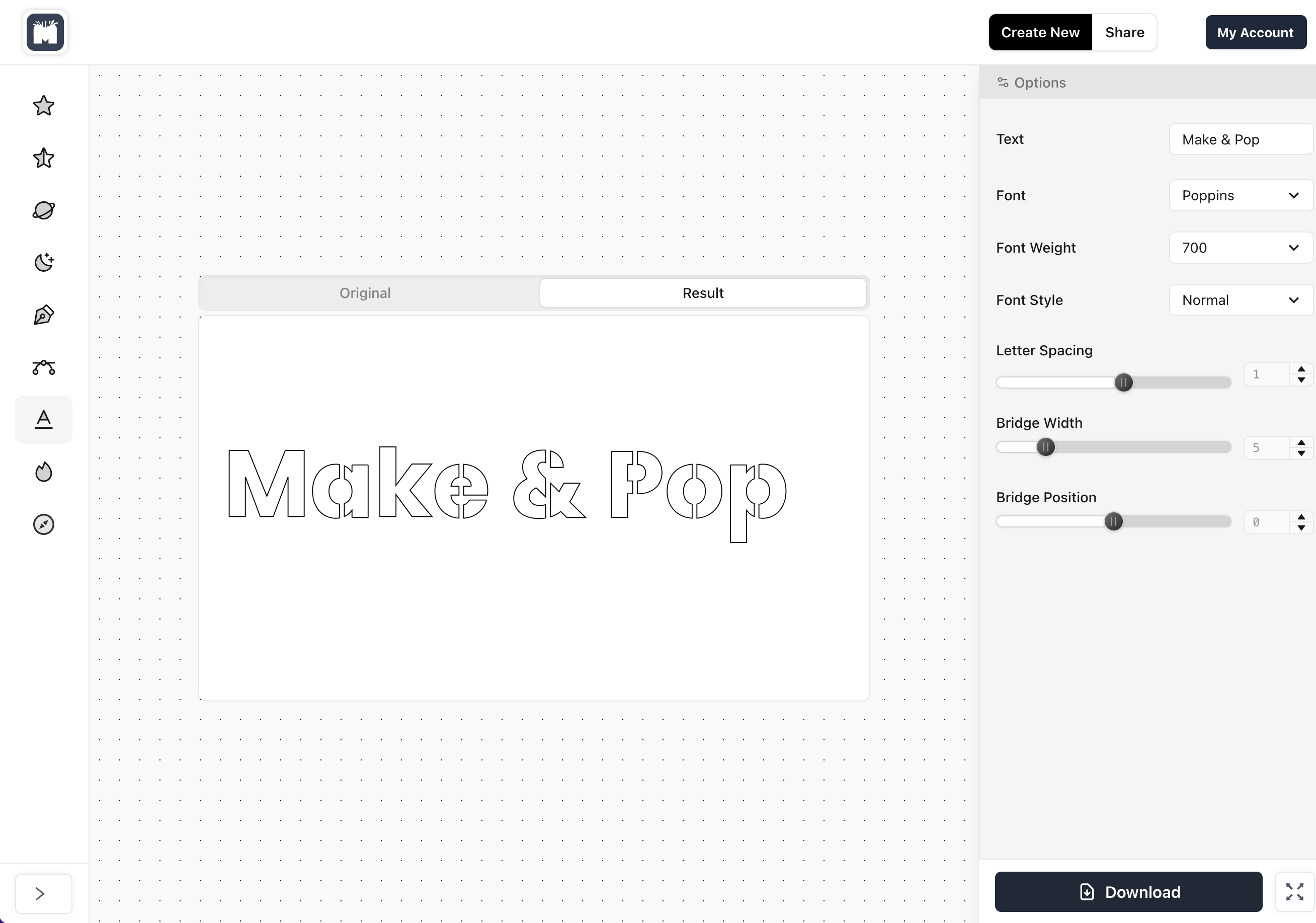
Automatic bridges. Maker-ready SVG.
Free Text Stencil Generator — Create text stencils from any font automatically.
Your text → cut-friendly stencil
- Automatically add bridges to turn any text into a durable stencil — no manual editing.
All Google Fonts supported
- Pick from thousands of Google Fonts, preview live, and get a ready-to-cut result.
Free Text Stencil Generator
- Create unlimited text stencils for free. Fast, simple, and built for makers.
SVG download
- Export a clean SVG cut file compatible with Cricut, Silhouette, Glowforge, and most cutters.
Bridge and thickness controls
- Fine-tune bridge width and stroke to match paint, material, and cutter settings.
Maker-ready output
- Single-color vectors with closed paths — perfect for painting, etching, and screen printing.
How to turn text into a stencil
Create stencil-ready typography automatically without manual bridge editing.
1) Enter your text and choose a font
Type the text you want to turn into a stencil and select a Google Font that matches your style or project.
2) Adjust bridge and thickness settings
Let the app automatically add bridges, then fine-tune bridge width and stroke settings to match your material, paint, and cutting workflow.
3) Download the SVG cut file
Export the stencil as a clean SVG file ready for Cricut, Silhouette, Glowforge, screen printing, painting, or etching workflows.
Experienced and trusted.
Make & Pop is used by leading creators, designers, DIYers, artists and crafters worldwide.
150,000+
Artwoks delivered
400+
Clients trusting us
135+
Countries reached
FAQ
Frequently asked questions
What is the Text Stencil Generator?
The Text Stencil Generator is a free online tool that turns text into a cut-friendly stencil. It automatically adds bridges to letters such as A, B, D, O, P, and R so the inner parts stay attached, making the design ready for cutting, painting, etching, and screen printing.
How does the Text Stencil Generator work?
You enter your text, choose a font, and the generator automatically converts it into stencil-ready lettering. It adds bridges where needed and lets you adjust settings such as bridge width and stroke thickness before exporting the final SVG cut file.
Can I turn any font into a stencil?
Yes. The app supports all Google Fonts and converts them into stencil-ready text automatically. This makes it easy to create stencil lettering from serif, sans-serif, script, or display fonts without manually editing the letter shapes.
Does it support Google Fonts?
Yes. The Text Stencil Generator supports Google Fonts directly, so you can choose from thousands of font styles and instantly preview how they look as stencil text.
What file format do I download?
You download an SVG stencil file with closed vector paths. This makes the output suitable for Cricut, Silhouette, Glowforge, laser cutters, and vector editing software such as Illustrator or Inkscape.
Can I use the SVG stencil with Cricut?
Yes. The generated SVG files are suitable for Cricut workflows and can be imported into Cricut Design Space for cutting stencil materials such as mylar, acetate, cardstock, or vinyl.
Can I use the stencil files with Silhouette or Glowforge?
Yes. The SVG output is compatible with Silhouette workflows that support SVG import and with laser-based workflows such as Glowforge, making it useful for both hobby and maker projects.
What are stencil bridges and why are they needed?
Stencil bridges are the small connecting sections that keep the inner islands of letters attached to the outer shape. Without bridges, letters like O or A would fall out when cut. The app inserts these bridges automatically so your stencil stays functional and durable.
Can I control bridge thickness?
Yes. You can adjust bridge width and related settings so the stencil works better for different materials, cutter tolerances, paint methods, and project sizes.
Can I make large stencils for signs and walls?
Yes. Because the output is SVG, it scales cleanly to larger sizes. This makes it suitable for wall stencils, wood signs, furniture projects, tile patterns, and other large-format stencil uses.
Can I use it for painting, etching, or screen printing?
Yes. The stencil output is useful for painted signs, fabric paint, home decor, glass etching, metal etching, and screen printing mask workflows. The clean single-color vector format also makes production easier.
Is this a free stencil font generator?
Yes. The Text Stencil Generator is free to use and works as a free stencil font generator by converting normal text into stencil-ready lettering automatically.
Do I need design skills to make a stencil?
No. The generator is designed to be simple to use, so you do not need graphic design or vector editing experience. You can create stencil text in just a few steps and export it ready for cutting.
What materials work best for cutting text stencils?
Common stencil materials include mylar, acetate, cardstock, and some vinyl or plastic sheets, depending on the cutter and final use. Thicker bridges are usually better for larger stencils, repeated use, or heavier paint applications.
Can I make reusable stencils?
Yes. If you cut the design from durable stencil material such as mylar or acetate, you can create reusable text stencils for signs, crafts, fabric projects, cookies, walls, and repeated painting applications.
What is the difference between normal text and stencil text?
Normal text often contains enclosed letter shapes that fall apart when cut. Stencil text includes bridges that hold those enclosed parts in place, making the lettering practical for physical stencil use.