Sun Print GeneratorFree Cyanotype UV Negative Maker
Create cyanotype (sun print) digital negatives from any photo.
Preview cyanotype tones • tune levels & gamma • print a step wedge • export print-ready pages.
Professional cyanotypes made easy.
Upload an image, preview cyanotype tones, generate a UV negative, calibrate exposure with a step wedge, and export print-ready pages • in minutes.
Generate a cyanotype UV negative
- Upload a photo and instantly create a clean digital negative for cyanotype (sun print) contact printing.
Cyanotype preview before you print
- See a Prussian-blue style preview so you can adjust your image with confidence before exposing.
Professional tonal control
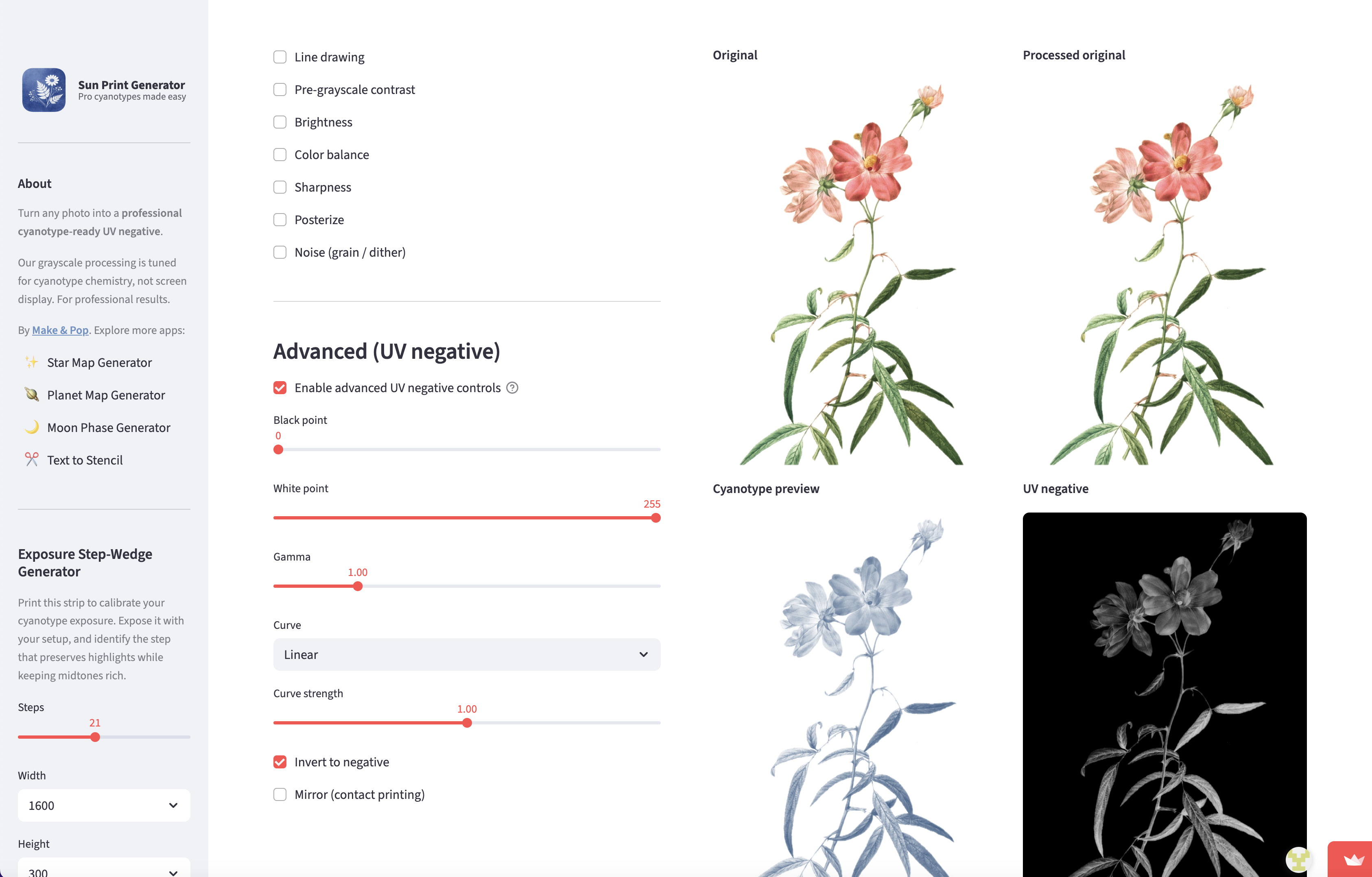
- Use levels (black/white point), gamma, and curve strength to protect highlights and keep midtones rich.
Transparency-safe processing
- Transparent pixels are treated as paper white, so your background won’t fog into unwanted blue.
Print-ready layouts at 300 DPI
- Export A4/A3/Letter pages with margins and crop marks—ready for inkjet transparencies.
Step-wedge exposure calibration
- Generate a step wedge to dial in exposure time for your specific paper, coating, and UV source.
What is a Sun Print (Cyanotype) Generator?
Sun Print Generator is an online tool that converts photos into cyanotype-ready digital negatives. Instead of guessing exposure and losing highlight detail, you can preview cyanotype tones and shape the tonal curve for more predictable results.
It’s built for cyanotype printing workflows: transparency-safe processing, repeatable exports, and calibration via a step wedge.
Tip: If you’re using a new paper/coating or UV lamp, run a step-wedge test once — then reuse your settings.
How to make a cyanotype digital negative
Cyanotype is not linear: highlights can wash out and shadows can block up. This workflow helps you keep separation where it matters.
1) Upload an image
Choose a photo or use an example image. High-contrast images are a great starting point, but photos work well too for cyanotype negatives.
2) Preview and tune tones
Adjust preprocessing and advanced tonal controls such as black point, white point, gamma, and curves to shape the negative for better cyanotype results.
3) Export and expose
Download a print-ready PNG or PDF at 300 DPI, print it on transparency film, contact print it on coated paper, and expose with sunlight or a UV lamp.
What can you make with cyanotype negatives?
Photography → Cyanotype Prints
Convert photos into cyanotype-ready negatives with highlight protection and consistent midtone separation—ideal for repeatable editions.
- UV negative tuned for cyanotype response
- Quick preview to reduce trial-and-error
- Export print-ready PDFs for studio workflow
Botanical & Photograms
Create crisp silhouettes and botanical compositions. Use contrast and curves to preserve delicate veins and fine edges.
- Great for botanicals and high-contrast art
- Optional line-drawing preprocessing
- Clean margins + crop marks for contact printing
Classes, Workshops & Schools
Use the step wedge to teach exposure and repeatable results. Students can export standardized A4/Letter sheets instantly.
- Step-wedge exposure testing built-in
- Consistent print layouts for groups
- Works with sunlight or UV lamps
Want more predictable cyanotype printing? Use the step-wedge once, then reuse your exposure time + negative settings for consistent results.
Experienced and trusted.
Make & Pop is used by leading creators, designers, DIYers, artists and crafters worldwide.
150,000+
Artwoks delivered
400+
Clients trusting us
135+
Countries reached
FAQ
Frequently asked questions
What does the Sun Print Generator do?
It turns any image into a cyanotype-ready UV negative for contact printing. You can preview cyanotype tones, adjust tonal controls (levels/gamma/curves), generate a step-wedge, and export print-ready pages as PNG or PDF.
Is “sun print” the same as cyanotype?
Yes. “Sun print” is a common name for cyanotype. Cyanotype is the photographic process that produces the deep Prussian-blue result when exposed to UV light and washed.
Do I need sunlight or a UV lamp?
Either works. Sunlight is traditional, while UV lamps (often 365–395nm) provide more repeatable exposure times—especially when you calibrate with a step wedge.
What is a digital negative for cyanotype?
A digital negative is an inverted black-and-white image printed onto transparency film. Darker areas block UV light, lighter areas allow more UV through, which controls the final blue density after development.
Why does transparency become black in the UV negative?
Transparent pixels are treated as white paper in processing. When the image is inverted into a UV negative, those areas become black so they block UV—preventing unwanted blue background (fogging).
Why is 300 DPI recommended?
300 DPI is a practical print standard for contact negatives: sharp enough for detail, compatible with most inkjet printers, and efficient for PDF/PNG export.
How do I calibrate exposure time?
Print a step wedge, expose it with your setup, then pick the time that preserves highlight detail while keeping midtones rich. Once calibrated, your results become far more repeatable.
What images work best for cyanotype negatives?
High-contrast images are a good starting point, but photos can work well too. Use the tonal controls (contrast, levels, gamma, curves) to keep highlights from washing out and shadows from blocking up.
What do I download?
You can download the cyanotype preview (PNG), the UV negative (PNG), and a print-ready page as PNG or PDF (A4/A3/Letter presets at 300 DPI).
Is the Sun Print Generator free?
Yes — it’s free to use.
Ready to make a cyanotype UV negative?
Upload a photo, preview the cyanotype look, generate a print-ready negative, and calibrate exposure using a step wedge.