RollForgeTexture Roller Generator for Clay & Polymer Clay
Make your own clay texture rollers by turning any pattern into a 3D printable texture roller. Preview the wrap, control relief depth, and download a custom texture roller STL.
Popular uses: texture roller for clay • polymer clay texture roller• pattern rollers • embossing rollers
Texture rollers made easy.
Upload a pattern, preview the wrap, generate your roller in 3D, and download a printable STL • in minutes.
Make your own texture roller
- Upload a pattern or grayscale image and generate a custom texture roller instead of buying generic designs.
Works with colored images (auto heightmap)
- Upload a colored image or photo — RollForge automatically converts it into a grayscale heightmap to generate the 3D texture.
Designed for clay & polymer clay
- Create clay texture rollers, polymer clay pattern rollers, and embossing rollers for crafts.
Preview the wrap before printing
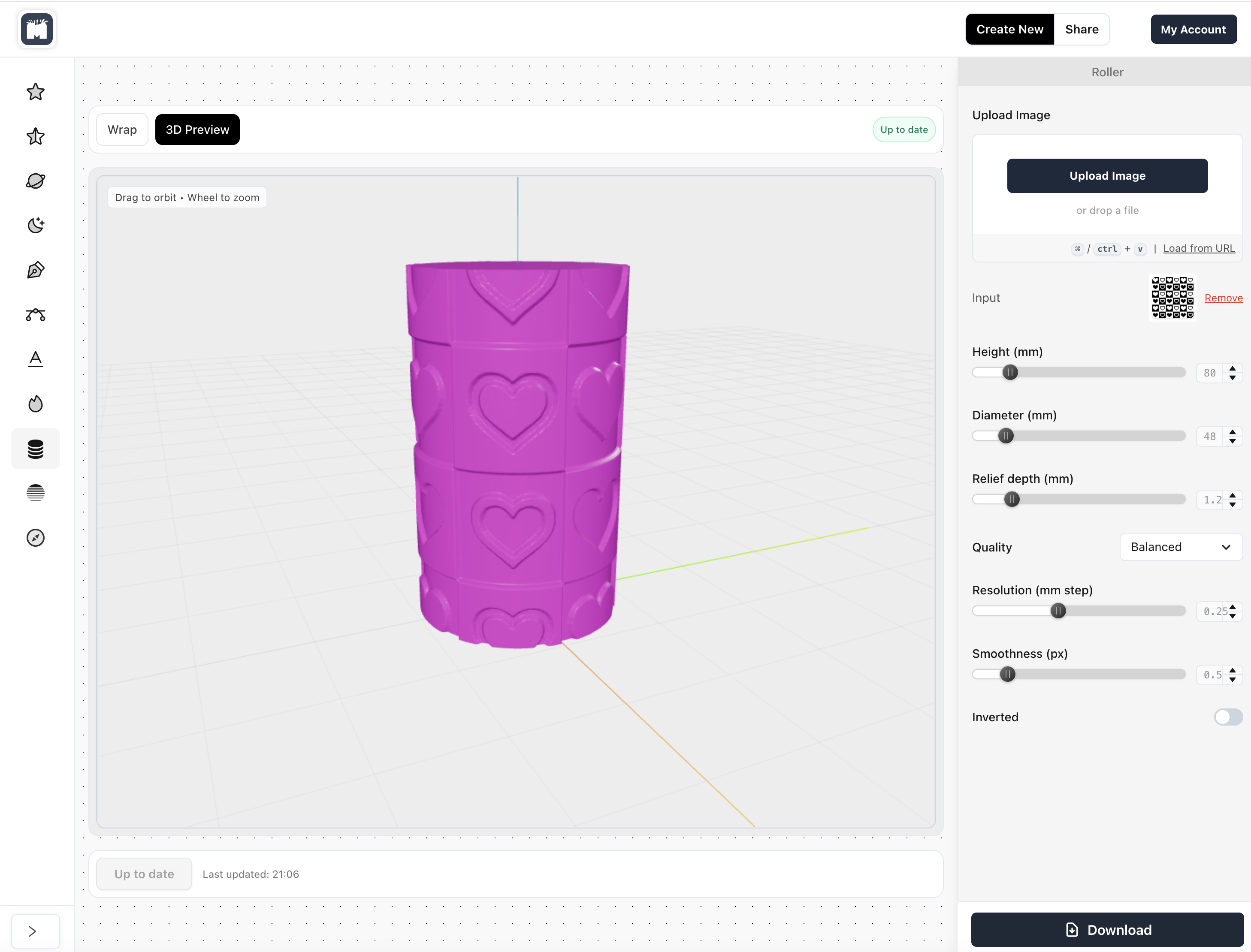
- See exactly how the image wraps around the roller so seams and alignment are where you want them.
Control size & relief depth
- Adjust roller diameter, length, and texture depth for subtle or bold embossing.
Download a 3D printable STL
- Export a texture roller STL ready for slicing and 3D printing.
What is RollForge?
RollForge is an online tool that turns images into custom texture rollers. Instead of buying generic rollers, you generate your own texture roller STL and 3D print it at home or with a printing service.
It’s ideal for makers looking for clay texture rollers, polymer clay pattern rollers, and embossing rollers for crafts.
Note: RollForge is not a “slab roller” machine — it generates smaller texture rollers you print and roll on material.
How to make a clay texture roller (STL)
RollForge converts an image into height and relief on a cylinder. You control diameter, length, relief depth, and mapping so the result prints cleanly and rolls smoothly on clay or polymer clay.
1) Upload a pattern
Use a high-contrast pattern, a grayscale heightmap, or even a colored image. RollForge converts it into a heightmap where lighter areas become raised and darker areas become recessed.
2) Preview and adjust
Preview how the pattern wraps around the roller. Adjust scale, alignment, and relief depth before generating the final model.
3) Download and 3D print
Download the STL file, slice it in your preferred slicer, and 3D print the roller for use on clay or polymer clay.
What can you use texture rollers for?
Pottery & Clay Slabs
Roll repeating textures into clay slabs, tiles, mugs, and hand-built forms using custom clay texture rollers.
- Make a texture roller for clay slabs and tiles
- Consistent repeating patterns (great for batches)
- Tune relief depth for subtle or bold impressions
Polymer Clay (Fimo, Sculpey, etc.)
Create polymer clay texture rollers and pattern rollers from your artwork—ideal for earrings, charms, and small-batch makers.
- Polymer clay texture roller designs from images
- Invert relief for embossed vs debossed looks
- Print, test, and iterate fast
Soap, Resin & Crafts
Design embossing rollers for soap, resin, foam and craft materials. Preview the wrap to control seams and alignment.
- Embossing roller for crafts
- Seam-aware wrap preview before generating
- Save/reuse settings for consistent output
Want a 3D printed texture roller that matches your brand or artwork? RollForge generates a texture roller STL from your image so you can print and reuse it whenever you want.
Experienced and trusted.
Make & Pop is used by leading creators, designers, DIYers, artists and crafters worldwide.
150,000+
Artwoks delivered
400+
Clients trusting us
135+
Countries reached
FAQ
Frequently asked questions
What does RollForge do?
RollForge turns an image (pattern or grayscale heightmap) into a 3D printable texture roller. You download the result as an STL file and 3D print the roller.
Is RollForge a physical clay roller?
No. RollForge is a digital tool. It generates a texture roller STL file that you 3D print and then use on clay, polymer clay, or other materials.
Is this the same as a slab roller?
No. A slab roller is a large machine used to flatten clay slabs. RollForge creates smaller texture rollers used to add surface patterns and textures.
What kind of images work best for texture rollers?
High-contrast patterns or grayscale heightmaps work best. Lighter areas become raised texture, while darker areas become recessed.
Can I use colored images or photos?
Yes. RollForge supports colored images and automatically converts them into a grayscale heightmap for the 3D texture. For best results, use images with clear shapes and good contrast.
Can I control how the image wraps around the roller?
Yes. RollForge includes a mapping preview where you can pan, zoom, and align your image before generating the roller.
Can I invert the relief (emboss vs deboss)?
Yes. You can invert the relief so raised areas become recessed and vice versa, depending on the effect you want.
Will a 3D printed texture roller work on real clay?
Yes. 3D printed texture rollers work well on moist clay, clay slabs, and polymer clay when printed with appropriate wall thickness and relief depth.
Is RollForge suitable for polymer clay?
Yes. RollForge is commonly used to create polymer clay texture rollers for earrings, charms, and decorative pieces.
What file format do I get?
RollForge exports a standard STL file that is ready for slicing and 3D printing.
What type of 3D printer do I need?
Any standard FDM 3D printer works. Many users print rollers in PLA, or PETG for improved durability.
How detailed can the texture be?
Detail depends on your image and print resolution. RollForge lets you control quality settings and relief depth for fine or bold textures.
Can I use my own artwork or logo?
Yes. You can upload your own artwork, patterns, or logos and turn them into repeating texture rollers.
Can I sell rollers or products made with them?
Yes. Many makers use RollForge to create custom rollers for selling physical rollers or finished products. Make sure you have the rights to any artwork you use.
Is RollForge free?
Yes — RollForge is free to use.